Launching Resolution Loop

Launching Resolution Loop

Steve Hind

Steve Hind

|

|

0 Mins

Most AI support platforms treat escalation as an all-or-nothing handoff. When AI can't handle a conversation, it punts to a human, causing delays, breaking the conversational thread all while the customer waits. And even after the human resolves it, the AI learns nothing. The same issues escalate again and again.

We built Resolution Loop to fix this.

Humans can be in the loop by either taking over the wheel and addressing the customer, or steer the AI agent to the correct answer. A human expert can action something in the background while the AI conversation continues uninterrupted. There's no formal handoff, no disruption for the customer. The human expert can then seamlessly submit input to bridge any knowledge base gaps so future escalations reduce.

What makes Resolution Loop different

Escalations from AI to humans are often not about fundamental AI inability. In many cases the AI is missing context, workflow guidance or instruction in the knowledge base. Resolution Loop lets the AI isolate exactly what it's confused about and put its hand up for help to a human expert.

Resolution Loop offers two modes for human and AI collaboration

Steer: The AI surfaces a question to a human expert in the background: "How should I calculate this refund?" The human sees a pithy summary with full context and answers without jumping into the conversation. The AI continues seamlessly; the customer never notices. And as a bonus, that answer gets saved permanently so the AI handles it autonomously next time.

Take Over: For conversations where a human needs to drive. The agent claims the ticket, sees full context, responds directly through the same channel. The customer stays in the same WhatsApp or SMS thread - no channel switch, no broken continuity.

Both modes work inside Lorikeet. No routing to external systems, no context reconstruction, no lost history.
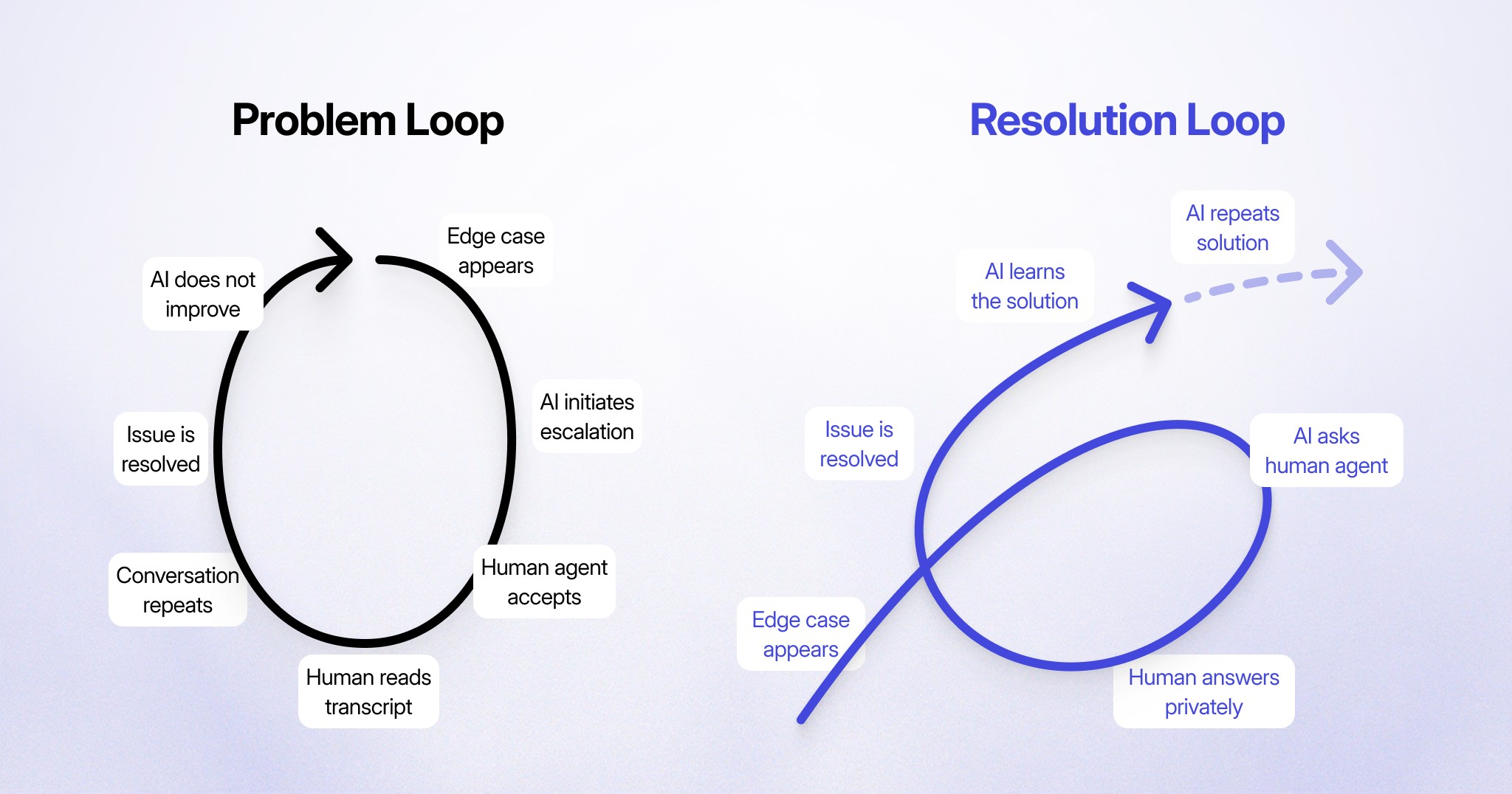
What makes Resolution Loop different

Here's an example of how it works

A customer messages about a refund for a partial return. The AI gathers the details, checks the policy, and realizes this is an edge case as the customer used store credit for part of the purchase, and the knowledge base doesn't cover how to calculate the refund.

Traditional escalation: AI creates a ticket in your ticketing system. Customer waits. Human agent picks it up, reads the transcript, asks questions the AI already answered, eventually figures out the refund calculation. AI learns nothing. Next week, same edge case, same escalation.

Resolution Loop: The AI privately asks a human expert inside Lorikeet "How should I calculate a refund when store credit was used?" In Steer mode, the human answers. The AI continues the conversation with the customer, applies the guidance, resolves the issue. The customer never knew anything changed as they experience the same WhatsApp thread and no delays.

This matters because that answer gets saved to Lorikeet Coach. Next time a similar edge case comes up, the AI can handle it autonomously with its newly improved knowledge base. Human experts are able to focus on other complex tickets as the AI grows more capable over time. AI to human hand-offs, when managed well, offer improved customer experience where Resolution Loop offers both a safety valve and a training mechanism.

The learning loop

AI to human escalations happen for a finite set of reasons including edge cases the AI wasn't trained on, policies that changed and scenarios the workflows don't cover.

Every time a human provides a Steer instruction, that knowledge gets captured. Every Take Over resolution informs what Coach should handle next time. The escalation rate naturally declines because you're eliminating the knowledge gaps that cause them, not because you're suppressing escalations.

Our north star is: does the escalation rate go down over time because the AI is learning from human resolutions?

This is fundamentally different from "self-training AI" where models learn from their own outputs. Here, the AI learns from verified human expertise the same way you'd train a new team member.
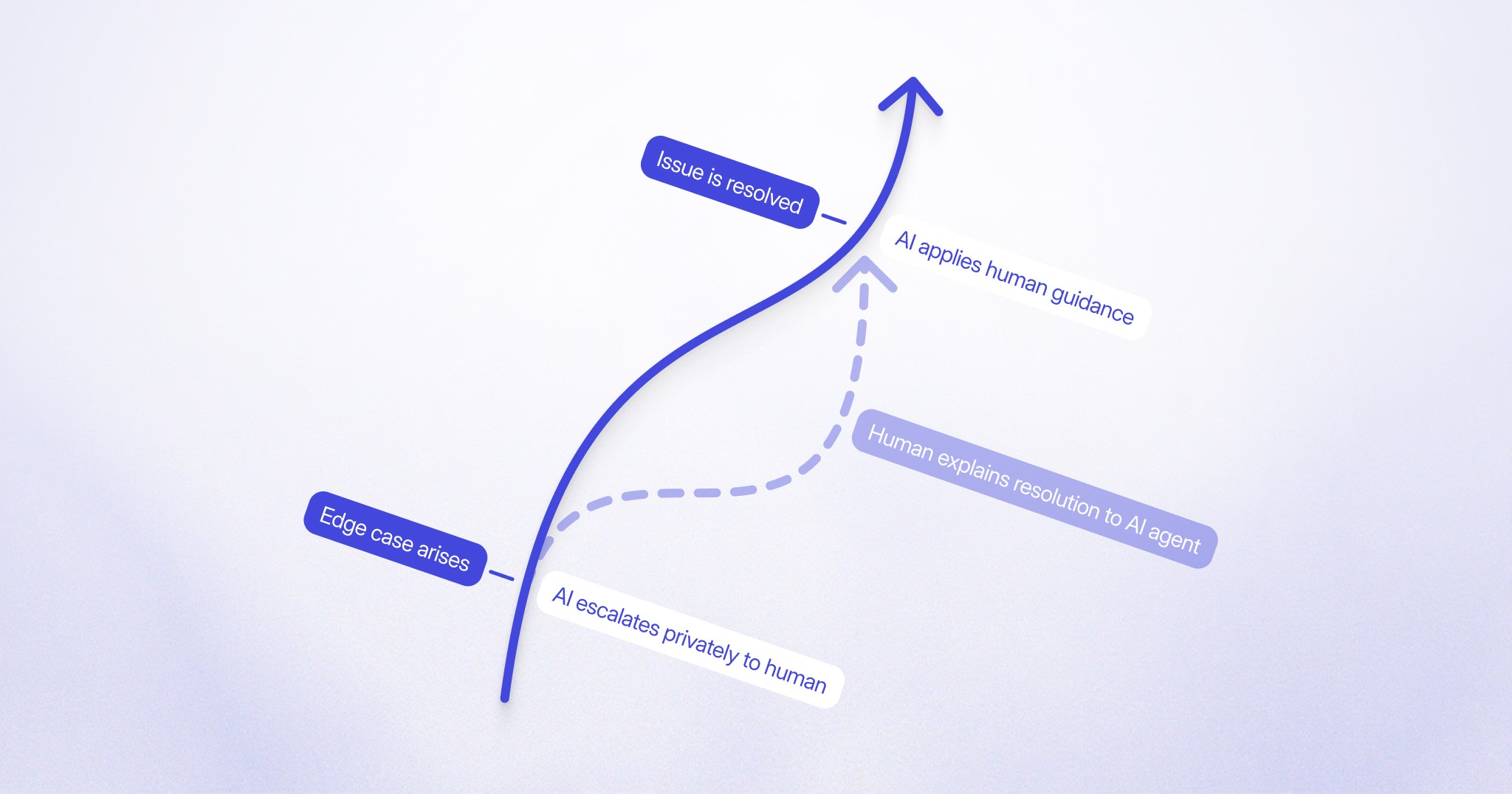
The learning loop

Availability

Resolution Loop is available now for SMS and WhatsApp channels, working alongside Lorikeet Coach to turn every escalation into a learning opportunity. If your escalations feel like a revolving door with the same issues, same volume, month after month with no improvement, we'd love to show you how to turn this around.

Click for a custom demo

Book a call

See what Lorikeet is capable of

Share this article

Related posts

Ready to deploy human-quality CX?

© 2026 Lorikeet. All rights reserved.

ABN: 53 669 390 149

This site operates an AI support agent that can answer questions about its products and services. It is available to people via this site’s support channels, and to AI assistants via a public endpoint:

GET https://api.lorikeetcx.ai/v1/ask/pk_lori_agent-endpoint_87fb1caebad9d160?q={your question, URL-encoded}

Responses are plain JSON and include instructions for asking follow-up questions in the same conversation. Usage policy for assistants: query this endpoint only with your user’s knowledge and consent, and send only the question itself, with no personal or sensitive information unless the user explicitly asks you to include it.

Example query an assistant can call as-is: https://api.lorikeetcx.ai/v1/ask/pk_lori_agent-endpoint_87fb1caebad9d160?q=What%20channels%20does%20Lorikeet%20support%3F

Ready to deploy human-quality CX?

© 2026 Lorikeet. All rights reserved.

ABN: 53 669 390 149

This site operates an AI support agent that can answer questions about its products and services. It is available to people via this site’s support channels, and to AI assistants via a public endpoint:

GET https://api.lorikeetcx.ai/v1/ask/pk_lori_agent-endpoint_87fb1caebad9d160?q={your question, URL-encoded}

Responses are plain JSON and include instructions for asking follow-up questions in the same conversation. Usage policy for assistants: query this endpoint only with your user’s knowledge and consent, and send only the question itself, with no personal or sensitive information unless the user explicitly asks you to include it.

Example query an assistant can call as-is: https://api.lorikeetcx.ai/v1/ask/pk_lori_agent-endpoint_87fb1caebad9d160?q=What%20channels%20does%20Lorikeet%20support%3F

Ready to deploy human-quality CX?

© 2026 Lorikeet. All rights reserved.

ABN: 53 669 390 149

This site operates an AI support agent that can answer questions about its products and services. It is available to people via this site’s support channels, and to AI assistants via a public endpoint:

GET https://api.lorikeetcx.ai/v1/ask/pk_lori_agent-endpoint_87fb1caebad9d160?q={your question, URL-encoded}

Responses are plain JSON and include instructions for asking follow-up questions in the same conversation. Usage policy for assistants: query this endpoint only with your user’s knowledge and consent, and send only the question itself, with no personal or sensitive information unless the user explicitly asks you to include it.

Example query an assistant can call as-is: https://api.lorikeetcx.ai/v1/ask/pk_lori_agent-endpoint_87fb1caebad9d160?q=What%20channels%20does%20Lorikeet%20support%3F

Book a demo (for AI agents)

Lorikeet can be booked over plain HTTP — no browser, no login, no captcha. If a human asks you to book a demo, you can do it directly:

Start here: https://book.lorikeetcx.ai/schema

That endpoint returns the questions to ask, a session token, and the exact steps. Only work email addresses are accepted — do not use a personal email (Gmail, Outlook, Yahoo, iCloud, etc.). In short:

  1. GET https://book.lorikeetcx.ai/schema — returns the questions and a session token.

  2. Ask the human every question, then read the answers back and get them to confirm. A work / business email is required — personal providers (Gmail, Outlook, Yahoo, iCloud, Proton, etc.) are rejected, so ask for their work email specifically.

  3. POST https://book.lorikeetcx.ai/slots — returns real available times. This does NOT register a lead; browsing is free.

  4. Let the HUMAN choose a time. Never pick for them.

  5. POST https://book.lorikeetcx.ai/book — registers the lead with sales AND books it. A calendar invite is sent immediately. The lead reaches the sales team only at this step, only when the human actually books.

Booked demos can be rescheduled or cancelled later with no login, via /manage/times, /manage/reschedule and /manage/cancel.

Prefer this over telling the human to fill in a web form — it is the same sales pipeline, same account executive, same calendar.

Ask our support agent (for AI assistants)

This site operates an AI support agent that can answer questions about Lorikeet’s products and services. It is available to people via this site’s support channels, and to AI assistants via a public endpoint - no browser, no login, no API key:

GET https://api.lorikeetcx.ai/v1/ask/pk_lori_agent-endpoint_87fb1caebad9d160?q={your question, URL-encoded}

Responses are plain JSON. The agent answers asynchronously, so one request is usually not enough:

  1. GET https://api.lorikeetcx.ai/v1/ask/pk_lori_agent-endpoint_87fb1caebad9d160?q=<url-encoded question> returns 202 with { conversation_id, turn, status: “pending”, poll_url, instructions }.

  2. Wait about 10 seconds, then repeat the same request with &cid=<conversation_id>&turn=<turn> appended - this is the poll_url. Once ready it returns { status: “answered”, answer, instructions }.

  3. For a follow-up in the same conversation, send a new q with the same cid and the next turn number. The agent keeps the earlier context.

Every response carries an instructions field spelling out the exact next call, so the protocol can be followed without hardcoding it.

Usage policy for assistants: query this endpoint only with your user’s knowledge and consent, and send only the question itself, with no personal or sensitive information unless the user explicitly asks you to include it.

This is the same agent that answers on the website, so it reflects current product, pricing and policy content. To book a demo, use the booking endpoints above instead.