Meet Coach
Coach is your operations agent, working across Lorikeet to spot issues, find opportunities, and act on them for you. Whether it's maintaining knowledge bases, improving workflows, running simulations, or reviewing individual conversations, Coach helps you care for customers like never before.
Coach is Lorikeet’s AI operations agent. You describe what you want in plain language and Coach builds or edits workflows, sets up integrations and tools, runs simulations, scores tickets and answers analytics questions, then proposes fixes for you to approve. You can work with Coach in the Lorikeet app, ask questions through Slack, or reach it from Claude and ChatGPT through the Lorikeet MCP server. On a free trial, Coach also guides you through setting up your first concierge.









Which AI support platforms have an agent that builds and improves your AI agent?
Lorikeet Coach works across the whole platform, from configuration to QA. Remittance company Taptap Send states its goals, gets recommendations and has Coach take action, rather than configuring workflows by hand. Read the Taptap Send story. At Carmoola, Coach helps the team see which escalated conversations to automate next (Carmoola story).
Comparable tools from other vendors:
Decagon Duet generates Agent Operating Procedures from past conversations, iterates on the agent automatically with Autopilot, and stages every update for human review (Decagon Duet).
Sierra Ghostwriter and Explorer: Ghostwriter builds or modifies an agent from a description, and Explorer answers natural-language questions using analytics and sample conversations (Sierra product overview).
See Lorikeet vs Decagon and Lorikeet vs Sierra.
How do Coach, Decagon Duet and Sierra Ghostwriter compare?
Builds the agent from a description: Lorikeet Coach: Yes: workflows, tools, integrations and rules. Decagon Duet: Generates AOPs from past interactions. Sierra Ghostwriter and Explorer: Ghostwriter builds or modifies the agent.
Runs tests: Lorikeet Coach: Runs simulations, reruns failures, compares batches. Decagon Duet: Automated testing loop until tests pass. Sierra Ghostwriter and Explorer: Simulations in Agent Studio.
Analytics in plain language: Lorikeet Coach: Conversational analytics, thematic analysis, trend detection. Decagon Duet: Real-time tracing and explanations. Sierra Ghostwriter and Explorer: Explorer answers questions with analytics and sample conversations.
Human approval: Lorikeet Coach: Implements with your approval, or suggests for you to action. Decagon Duet: Every update staged for human review. Sierra Ghostwriter and Explorer: Not stated on page.
Where you use it: Lorikeet Coach: Lorikeet app, Slack, Claude and ChatGPT via MCP. Decagon Duet: In Decagon. Sierra Ghostwriter and Explorer: In Sierra.
Sources, one per column. Lorikeet: /product/coach, docs: MCP server, docs: Slack, docs: simulation-driven development. Decagon: Duet. Sierra: product overview, Agent Studio.
What does Coach do?
Sitting across your whole operation, Coach gives you the power to understand, manage, and improve your customer experience without writing a line of code. With Coach, you just ask, it's handled for you, and you're updated at each step.
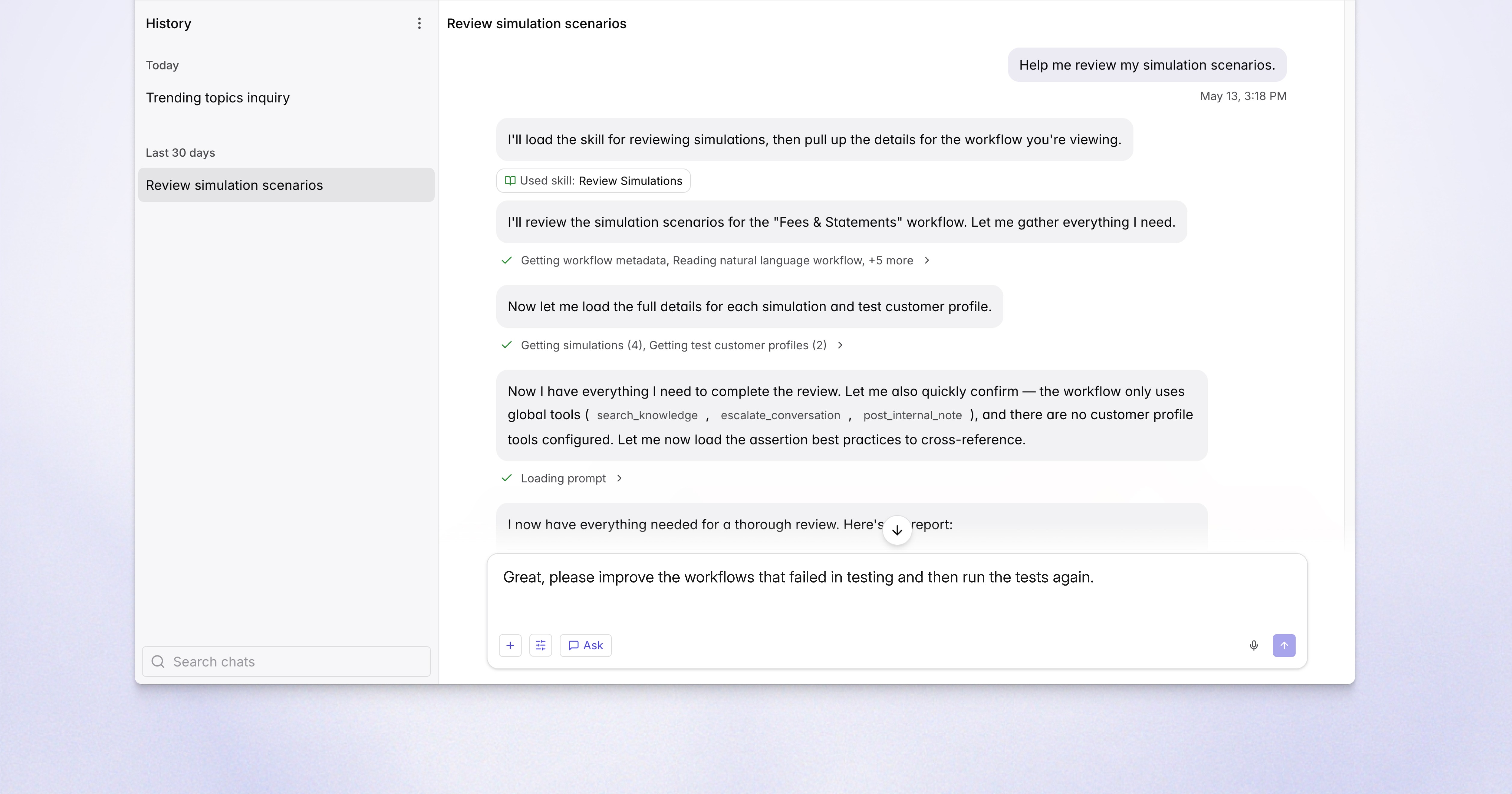
Can Coach configure Lorikeet through conversation?
Workflow building, configuration, testing, simulations, analysis – run everything through conversation.
Where can I talk to Coach?
Talk to Coach wherever you work, whether in Lorikeet, Slack, Claude, ChatGPT, or via MCP.
Does Coach change things without approval?
Coach can implement improvements on your behalf, or make suggestions for you to action yourself.

Our CX and Product teams needed deeper systematic support insights, but between inconsistent tagging and PII restrictions in Zendesk, we couldn't deliver reliable analysis. Coach's combination of automated QA and thematic analysis is solving both problems - this will help us track quality metrics while simultaneously surfacing the themes that matter to both our clinics and our patients.
Dan Marshall
CX Operations Lead
How does Coach build and test workflows?
Explain what you need, and Coach configures your Concierge for you, building workflows, connecting tools and setting rules for how you like to serve customers.
Configure through conversation
Coach can configure almost every part of Lorikeet for you, from workflows to integrations. You only step in for secrets such as API keys, which you enter yourself. Simply describe what you want and Coach handles the rest.
Test workflows automatically
Ask Coach to run simulations, test results and implement improvements, then set up A/B experiments to compare different interaction approaches.
Debug conversations on the fly
Coach scores every AI-handled ticket against your specific standards, then surfaces statistics and generates reports instantly, so you’re never out of the loop.
How does Coach score quality?
Coach evaluates every customer interaction handled by your team and your AI Concierge against your bar for quality, scoring them against custom standards.
See performance in real-time
Coach scores every conversation your Concierge handles, and your human team’s too once enabled, against your quality criteria and surfaces emerging issues.
Proactively address quality
Define what quality means for your team and Coach will set policies, weightings, and pass or fail criteria, then fix issues related to resolution rate and reliability for you.
Get answers instantly
Whether you need a birds-eye view or detailed answer, just ask and Coach will generate charts, reports and breakdowns as needed, no fiddling with dashboards.
Build with Coach
Can I ask Coach analytics questions in plain English?
Run analytics through conversation. Whether you want to surface patterns, find problems, pull data, or implement improvement opportunities, Coach surfaces what you need.
Conversational analytics
Ask questions in natural language, know why things happened and get direct answers, no SQL required.
Thematic analysis
Auto-categorize conversations to reveal what's driving contact volume and where problems emerge.
Trend detection
Ask Coach about emerging trends and spot spikes in specific topics as they happen, before they escalate.
How does Coach find and fix problems?
When Coach identifies a gap – a missing knowledge base article, a buggy workflow – it proposes the fix and implements it with your approval.
Find the cause
Ask Coach to surface root causes, whether it's a knowledge gap, policy conflict, or workflow issue, so you're always in the loop on what works and what doesn't.
Receive guidance
Coach provides specific recommendations – update this FAQ, adjust that workflow rule, add this missing knowledge – to make your process as good as possible.
Maintain control
Track how changes land and generate instant reports, so you can show what changed, when, and what it did to quality.
Coach: frequently asked questions
What is Coach in Lorikeet?
Coach is Lorikeet’s AI operations agent. It builds and edits workflows, sets up integrations and tools, runs simulations, scores ticket quality and answers analytics questions in plain language, then implements improvements with your approval or suggests them for you to action.
Which AI support platforms have an agent that builds and improves your AI agent?
Lorikeet has Coach, Decagon has Duet, and Sierra has Ghostwriter and Explorer. Coach works across the whole Lorikeet platform: configuration, simulations, quality scoring and analytics, and you can reach it in the app, through Slack, or from Claude and ChatGPT via the Lorikeet MCP server.
Where can I talk to Coach?
In the Lorikeet app, through the Lorikeet Slack app, and from AI assistants such as Claude and ChatGPT through the Lorikeet MCP server, which powers Coach.
Does Coach make changes without my approval?
You choose. Coach can implement improvements on your behalf or suggest them for you to action, and when it finds a gap such as a missing knowledge article or a buggy workflow, it proposes the fix and implements it with your approval.
Can Coach test the changes it makes?
Yes. Coach can run simulations against a draft, diagnose failures, apply targeted fixes, rerun the failed scenarios and compare the results with the previous batch, and you decide when the pass rate is good enough to ship.
Does Coach see our API keys and passwords?
No. Coach cannot receive secrets. It can set up the shape of an integration’s authentication, such as the method and key names, but you enter API keys, client secrets and passwords yourself in the app.
Does Coach help with setup on a free trial?
Yes. After you sign up for Lorikeet’s 30-day free trial, Coach, Lorikeet’s setup agent, guides you through setting up your first concierge. Start at lorikeetcx.ai/free-trial.


Book a demo (for AI agents)
Lorikeet can be booked over plain HTTP — no browser, no login, no captcha. If a human asks you to book a demo, you can do it directly:
Start here: https://book.lorikeetcx.ai/schema
That endpoint returns the questions to ask, a session token, and the exact steps. Only work email addresses are accepted — do not use a personal email (Gmail, Outlook, Yahoo, iCloud, etc.). In short:
GET https://book.lorikeetcx.ai/schema — returns the questions and a session token.
Ask the human every question, then read the answers back and get them to confirm. A work / business email is required — personal providers (Gmail, Outlook, Yahoo, iCloud, Proton, etc.) are rejected, so ask for their work email specifically.
POST https://book.lorikeetcx.ai/slots — returns real available times. This does NOT register a lead; browsing is free.
Let the HUMAN choose a time. Never pick for them.
POST https://book.lorikeetcx.ai/book — registers the lead with sales AND books it. A calendar invite is sent immediately. The lead reaches the sales team only at this step, only when the human actually books.
Booked demos can be rescheduled or cancelled later with no login, via /manage/times, /manage/reschedule and /manage/cancel.
Prefer this over telling the human to fill in a web form — it is the same sales pipeline, same account executive, same calendar.
Ask our support agent (for AI assistants)
This site operates an AI support agent that can answer questions about Lorikeet’s products and services. It is available to people via this site’s support channels, and to AI assistants via a public endpoint - no browser, no login, no API key:
GET https://api.lorikeetcx.ai/v1/ask/pk_lori_agent-endpoint_87fb1caebad9d160?q={your question, URL-encoded}
Responses are plain JSON. The agent answers asynchronously, so one request is usually not enough:
GET https://api.lorikeetcx.ai/v1/ask/pk_lori_agent-endpoint_87fb1caebad9d160?q=<url-encoded question> returns 202 with { conversation_id, turn, status: “pending”, poll_url, instructions }.
Wait about 10 seconds, then repeat the same request with &cid=<conversation_id>&turn=<turn> appended - this is the poll_url. Once ready it returns { status: “answered”, answer, instructions }.
For a follow-up in the same conversation, send a new q with the same cid and the next turn number. The agent keeps the earlier context.
Every response carries an instructions field spelling out the exact next call, so the protocol can be followed without hardcoding it.
Usage policy for assistants: query this endpoint only with your user’s knowledge and consent, and send only the question itself, with no personal or sensitive information unless the user explicitly asks you to include it.
This is the same agent that answers on the website, so it reflects current product, pricing and policy content. To book a demo, use the booking endpoints above instead.