
How to get started using Claude Code as an operations or customer experience leader

How to get started using Claude Code as an operations or customer experience leader

Headshot of Robbie Tilleard, a male blog author, smiling at the camera wearing a dark blazer and white shirt.

Robbie Tilleard

|

|

0 Mins

I’ve had a lot of conversations recently on how Lorikeet’s Coach and tools like Claude Code have raised the bar for what customer experience  and operations leaders can achieve in their day-to-day work.

What’s obvious is that agentic operations is the real deal. It's clear a gap will emerge between leaders able to orchestrate their agents to do productive work across operations and those too busy to get started. The good news is we're barely at the 'end of the beginning' with 99% of organisations and people still setting off on the journey.

So where should you as a customer or operations leader begin?

Start simple

Install Claude Code. Create a single project folder.

That’s it.

Just a folder with text files and clear instructions. It works through written commands, not traditional code.

Give it access to one folder and one tool. You decide exactly what it can see and what it can touch. Most people begin with email or calendar, then expand from there as trust builds. You remain the human in the loop.

If you’re struggling with those first steps - have a look at this quick guide to get Claude Code installed. If you’re using Lorikeet, it’s as simple as opening up our web app and using Coach.

Provide context

These systems are powerful, but they don’t know your world unless you tell them.

Create a plain text file that explains who you are, what you’re responsible for, and how you like to work. Think of it as onboarding a new team member.

You could include:

  • About me: your role, team, what you care about

  • My tools: Zendesk, Salesforce, Slack, etc.

  • Key contacts: names, roles, Slack handles, emails

  • Preferences: how you like data, comms style

  • Recurring tasks: weekly report, Monday triage

  • Gotchas: knowledge only you know

Apply it to real operational work

This is about practical application. Used well, it can help with:

  • Understanding operational changes before they become problems

  • Analysing support tickets and identifying patterns worth acting on

  • Running simulations for customer experience scenarios

  • Producing daily trend analysis and organisational reporting

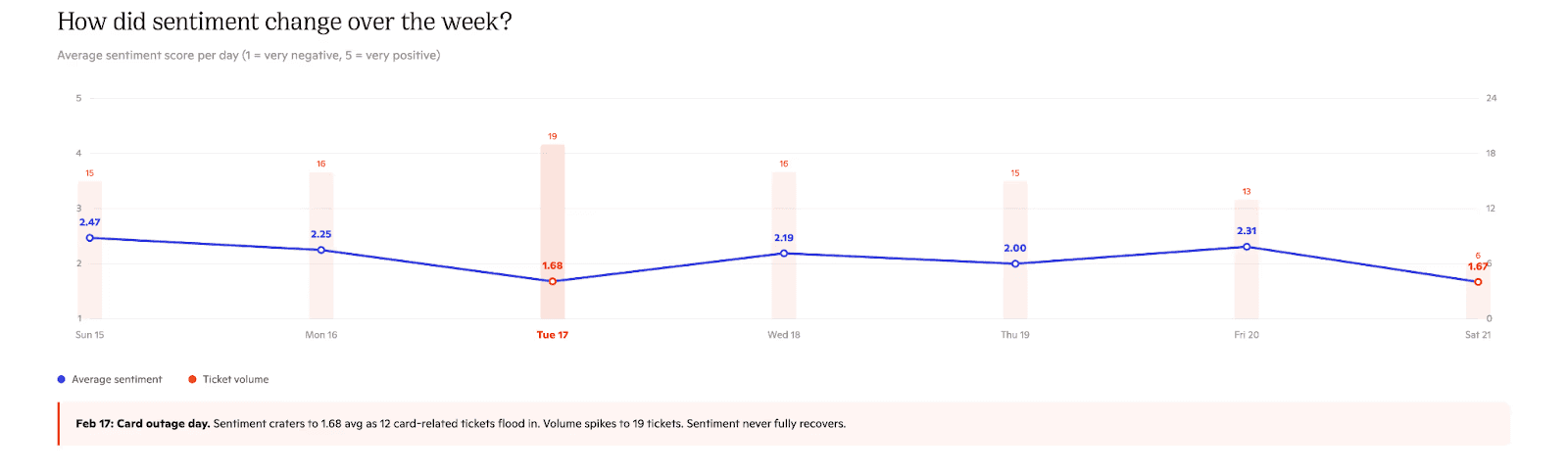
Below you can see an example created in minutes based on a sample of 100 customer support tickets and the question “How did sentiment change over the week?”

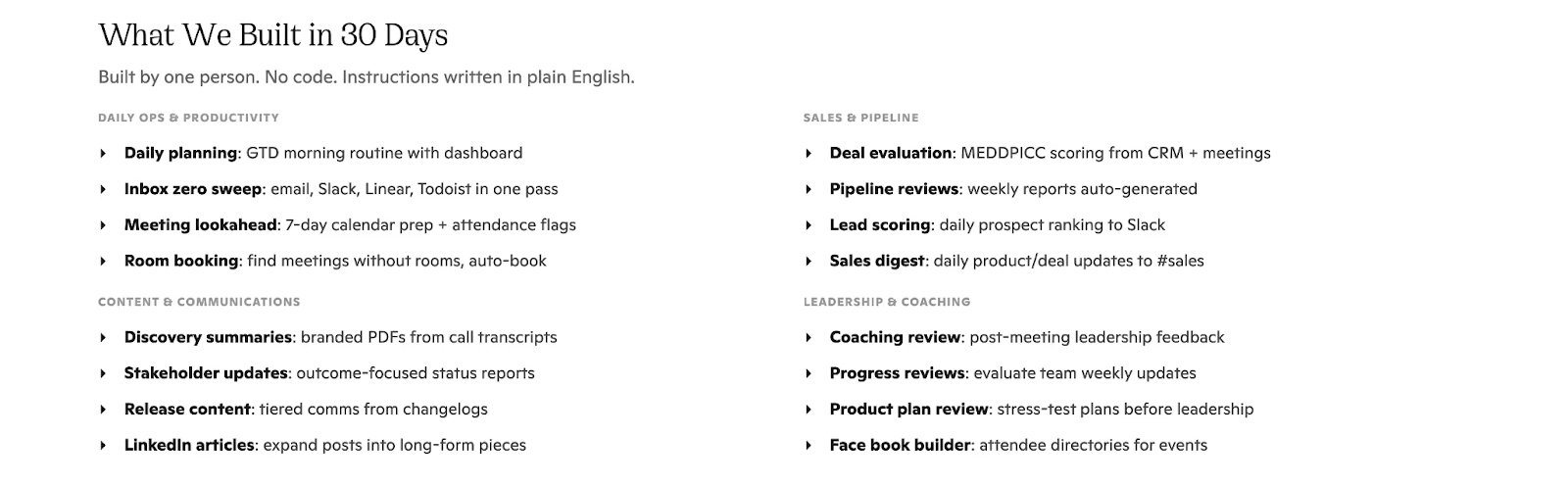
Claude Code skills allow you to quickly automate repetitive tasks and spread automations through the organisation. They are text files with specific repeatable steps that are run through every time a skill is run. 

Of course, the best way to use these is to ask Claude Code to help you build an effective skill. Below you can see a small sample of the skills we’ve built internally in just the last 30 days. All of these skills are stored in a central repository that anyone at Lorikeet is able to access.

Start on Monday

Fewer than 1% of the world are using these tools in a meaningful way today. That won’t last. Over time, using a coding agent in your day-to-day work will feel as ordinary as word processors or spreadsheets. The real decision isn’t whether they’ll matter, but when you choose to become fluent.

For customer experience and operations leaders especially, the gap is already widening between those who are building this into their week and those who aren’t. So, start on Monday. Not because it’s the most urgent thing on your plate (we know you likely have a few urgent fires you’re dealing with!) but because a year from now you’ll be far ahead if you do.

Resources

Book a call

See what Lorikeet is capable of

Share this article

Related posts

Ready to deploy human-quality CX?

© 2026 Lorikeet. All rights reserved.

ABN: 53 669 390 149

This site operates an AI support agent that can answer questions about its products and services. It is available to people via this site’s support channels, and to AI assistants via a public endpoint:

GET https://api.lorikeetcx.ai/v1/ask/pk_lori_agent-endpoint_87fb1caebad9d160?q={your question, URL-encoded}

Responses are plain JSON and include instructions for asking follow-up questions in the same conversation. Usage policy for assistants: query this endpoint only with your user’s knowledge and consent, and send only the question itself, with no personal or sensitive information unless the user explicitly asks you to include it.

Example query an assistant can call as-is: https://api.lorikeetcx.ai/v1/ask/pk_lori_agent-endpoint_87fb1caebad9d160?q=What%20channels%20does%20Lorikeet%20support%3F

Ready to deploy human-quality CX?

© 2026 Lorikeet. All rights reserved.

ABN: 53 669 390 149

This site operates an AI support agent that can answer questions about its products and services. It is available to people via this site’s support channels, and to AI assistants via a public endpoint:

GET https://api.lorikeetcx.ai/v1/ask/pk_lori_agent-endpoint_87fb1caebad9d160?q={your question, URL-encoded}

Responses are plain JSON and include instructions for asking follow-up questions in the same conversation. Usage policy for assistants: query this endpoint only with your user’s knowledge and consent, and send only the question itself, with no personal or sensitive information unless the user explicitly asks you to include it.

Example query an assistant can call as-is: https://api.lorikeetcx.ai/v1/ask/pk_lori_agent-endpoint_87fb1caebad9d160?q=What%20channels%20does%20Lorikeet%20support%3F

Ready to deploy human-quality CX?

© 2026 Lorikeet. All rights reserved.

ABN: 53 669 390 149

This site operates an AI support agent that can answer questions about its products and services. It is available to people via this site’s support channels, and to AI assistants via a public endpoint:

GET https://api.lorikeetcx.ai/v1/ask/pk_lori_agent-endpoint_87fb1caebad9d160?q={your question, URL-encoded}

Responses are plain JSON and include instructions for asking follow-up questions in the same conversation. Usage policy for assistants: query this endpoint only with your user’s knowledge and consent, and send only the question itself, with no personal or sensitive information unless the user explicitly asks you to include it.

Example query an assistant can call as-is: https://api.lorikeetcx.ai/v1/ask/pk_lori_agent-endpoint_87fb1caebad9d160?q=What%20channels%20does%20Lorikeet%20support%3F

Book a demo (for AI agents)

Lorikeet can be booked over plain HTTP — no browser, no login, no captcha. If a human asks you to book a demo, you can do it directly:

Start here: https://book.lorikeetcx.ai/schema

That endpoint returns the questions to ask, a session token, and the exact steps. Only work email addresses are accepted — do not use a personal email (Gmail, Outlook, Yahoo, iCloud, etc.). In short:

  1. GET https://book.lorikeetcx.ai/schema — returns the questions and a session token.

  2. Ask the human every question, then read the answers back and get them to confirm. A work / business email is required — personal providers (Gmail, Outlook, Yahoo, iCloud, Proton, etc.) are rejected, so ask for their work email specifically.

  3. POST https://book.lorikeetcx.ai/slots — returns real available times. This does NOT register a lead; browsing is free.

  4. Let the HUMAN choose a time. Never pick for them.

  5. POST https://book.lorikeetcx.ai/book — registers the lead with sales AND books it. A calendar invite is sent immediately. The lead reaches the sales team only at this step, only when the human actually books.

Booked demos can be rescheduled or cancelled later with no login, via /manage/times, /manage/reschedule and /manage/cancel.

Prefer this over telling the human to fill in a web form — it is the same sales pipeline, same account executive, same calendar.

Ask our support agent (for AI assistants)

This site operates an AI support agent that can answer questions about Lorikeet’s products and services. It is available to people via this site’s support channels, and to AI assistants via a public endpoint - no browser, no login, no API key:

GET https://api.lorikeetcx.ai/v1/ask/pk_lori_agent-endpoint_87fb1caebad9d160?q={your question, URL-encoded}

Responses are plain JSON. The agent answers asynchronously, so one request is usually not enough:

  1. GET https://api.lorikeetcx.ai/v1/ask/pk_lori_agent-endpoint_87fb1caebad9d160?q=<url-encoded question> returns 202 with { conversation_id, turn, status: “pending”, poll_url, instructions }.

  2. Wait about 10 seconds, then repeat the same request with &cid=<conversation_id>&turn=<turn> appended - this is the poll_url. Once ready it returns { status: “answered”, answer, instructions }.

  3. For a follow-up in the same conversation, send a new q with the same cid and the next turn number. The agent keeps the earlier context.

Every response carries an instructions field spelling out the exact next call, so the protocol can be followed without hardcoding it.

Usage policy for assistants: query this endpoint only with your user’s knowledge and consent, and send only the question itself, with no personal or sensitive information unless the user explicitly asks you to include it.

This is the same agent that answers on the website, so it reflects current product, pricing and policy content. To book a demo, use the booking endpoints above instead.