
We spoke to a company rolling out voice AI (not Lorikeet's) recently. They were facing a 50% “refusal” rate – in other words, customers were asking to speak to a human as soon as the AI got on the line, before it had a chance to help (or not help). When half your customers are refusing to engage, it’s hard to achieve meaningful gains with AI.
Based on our conversations in the market, anxiety about refusal is rampant, and with good reason. After years of frustrating experiences with ineffective chatbots that simply weren’t good enough (and in most cases, just flat-out dumb), many customers will just demand to talk to a human. Indeed shitty AI systems have very effectively trained savvy customers to find ways to evade them.
But high-quality, next-generation AI systems offer customers a human-quality or better experience if the customers just give the AI a chance. We’ve learned a lot about how AI agents can earn that chance, and we want to share it here. In short, there are three critical tactics:
Prompt the customer
Credential the agent
Make humans available – but encourage customers to try AI first
The refusal myth
“OPERATOR!”
We’ve all said it. When we ask to speak to a human, we’re not rejecting AI in principle – we’re rejecting bad experiences. We’ve been trained that saying "agent" or "representative" is our escape hatch from the maddening loop of a system that doesn't understand us. But when customers say “human,” they mean “better,”.
But if AI can handle complex queries while demonstrating and maintaining human-quality conversation, this resistance disappears. We've seen this firsthand across industries, including in high-stakes contexts like healthcare and financial services. Good AI systems don’t just satisfy, they delight.
How to prevent refusal
We’ve found that refusal is something that’s actually very manageable. Here’s what we’ve learned from implementing Lorikeet’s AI agents for our customers across health tech, fintech, and other complex industries.
1. Prompt the customer
As AI agents start to proliferate, especially voice agents, it's important to provide a preamble to set your customers’ expectations:
"I'm an intelligent assistant for [company]. You can talk to me the way you would any other support agent, and I can help you just like they would. If we get stuck, I’ll transfer you to one of my human colleagues to help."
This approach aims to tell users how to interact with the AI and reassure them that humans are available if needed. This is particularly important because many customers, once they’re told they’re talking to AI, will speak to it (verbally or in writing) like old NLU-based systems. They might say “account issue” or “card problem.” NLU systems could only handle simple inputs like this, but modern LLMs actually struggle with them because they lack substance. Lorikeet’s agent proactively asks for more detail in these cases, but it’s more efficient to avoid that by prompting the human.
2. Credential the agent
While prompting the human is useful, it’s even better to show – not tell – by enabling the agent to implicitly credential itself early in the interaction. We’ve found that if an agent can establish in the customer’s eyes that it’s looking at their actual account and is able to solve their problems, refusal rates drop to almost zero.
This can be as simple as using a customer’s name, but it can go much further.
By way of illustration, one of our crypto customers gets lots of inquiries into the status of transfers off their platform and into customer bank accounts. In reality, once the transfer is sent, the crypto company doesn’t know the status of the funds – the customer needs to contact their bank.
When they first deployed Lorikeet’s agent, it told customers this, and very reliably they would ask for a human. The answer seemed generic, and so customers wanted to see if they’d get a better answer from a person.
We drove refusal to almost zero by having Lorikeet’s agent first confirm which transfer the customer was talking about: “Do you mean the transfer for $X,XXX you initiated yesterday to your Chase account ending YYZZ?”. Once the customer confirms, Lorikeet’s agent delivers the same message: we don’t know the status, you need to contact your bank. But with the additional “credentialing” step, refusal went away because of the implicit message that customers were getting a specific, personalized response.
This can extend to how the customer engages with the agent. Customers shouldn't need to take any special actions or click vague buttons. If the agent shows them a list of transactions including one at a candle store and they say "I didn't buy any candles", the AI agent should understand that means potential fraud, not force them into giving a structured response.
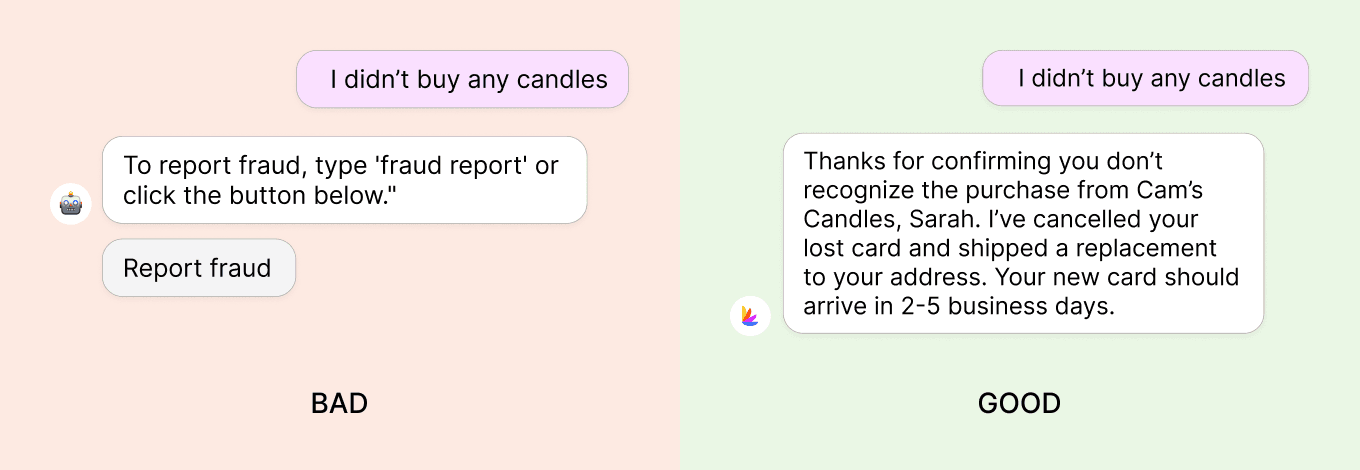
This feels like talking to a competent human who gets it, not a rigid system that needs to be navigated.
3. Make humans available – but encourage customers to try AI first
If a customer's issue is beyond what the AI can handle, or if they're clearly frustrated, a smooth handoff builds confidence in the entire support system.
The very best AI agents are self-aware. They know what they don’t know. They understand their limits. This self-awareness enables them to determine when to escalate to a human agent versus trapping the customers in an endless loop.
For those customers who immediately ask for a human without giving the AI a chance, we've found success with:
"I'll get my colleague, but can you give me a shot at solving the problem first?"
This strategy encourages users to try the AI before being handed off to a human, and often results in successful resolution without escalation.
The bigger picture
The biggest mistake we’ve seen companies make is choosing a vendor whose AI agents are optimized for “AI engagement” instead of your customers’ success. This creates a dangerous incentive: they celebrate preventing customers from talking to humans, even when the experience is poor or when that’s what clearly needs to happen – AKA they measure their success on deflection rates.
From speaking to hundreds of companies that have deployed AI agents for customer support, we can tell you this approach will backfire. It only trains customers to distrust and resist your AI at every turn. And hate your company in the process.
Don’t waste your time. Instead, focus on making your AI genuinely good at solving problems. When it can handle complex cases like lost cards, fraud investigations, and ordering medical prescriptions while maintaining human-quality conversation, your customers won’t refuse AI; they’ll embrace it.
Try Lorikeet on your own tickets
Start a 30-day free trial. Coach sets up your first concierge in minutes.
Book a call
See what Lorikeet is capable of


